CURRENTLY SOLD OUT
About this product
Product Identifiers
BrandMSI
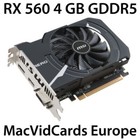
MPNRX 560 AERO ITX 4G OC
GTIN0824142144435
eBay Product ID (ePID)16021686667
Product Key Features
Chipset ManufacturerMSI
Chipset/GPU ModelAMD Radeon RX 560
Ratings and Reviews
Most relevant reviews
- Aug 08, 2018Top favorable review
MSI RX560 Aero ITX 4G OC - your memory may vary
Be sure to distinguish the Micron memory from the Hynix ones. You may also find these with Samsung or Elpida GDDR5 as well. Depending on what you're doing with the card(s), you may notice a performance advantage of one type of memory over the other. Latest batch of Micron (Q!, Q2 '18) are quite good actually, whereas with last year's production, the Hynix was more in demand. As always, best of luck finding Samsung video ram. If you do, it is a lucky find.Verified purchase: YesCondition: Pre-owned
- Jan 24, 2018Top critical review
Performs well, but.
Upon opening the box, I found a brief set of instructions included in the box, along with a CD for the drivers. The instructions never made it clear when or how to install the card and the drivers, so it was trial and error. The drivers need to be installed first, power down the PC, install the card, and boot up. The box has a requirement of a 400 Watt power supply posted, but nowhere else in the specifications or instructions. Mine appears to be working as expected with a 250 Watt power supply. The instructions packed with the box may have been incorrect, as it shows a power harness connecting directly to the card. There's no receptacle on my card for a power connector. This card was purchased mainly to make my HP tower PC compatible with my Ultra HD 43" LG monitor. While 4K videos produce breathtaking results, with no apparent digital artifacting, I can't find a monitor or adapter setting that doesn't over-scan the screen by about 1/2" in all directions. So I really can't give this product five stars, without knowing why the over scan, and the poor in box instructions don't provide much help.Verified purchase: YesCondition: New
- Nov 12, 2018
Works well on Mac Pro 5,1, Mojave-ready, like the price compared to other cards
This is the least expensive of the cards Apple specs as working in a 5,1 (2009 - 2010) Mac Pro with Mojave. It's doing 4K@60Hz on two monitors, one connected by HDMI and the other by DVI-D. No power supply wire needed (powered by PCI slot), no drivers needed (built into macOS 10.13+; no idea whether it'll work with 10.12). If you use it on a Mac, I'd recommend SwitchResX (madrau.com) to unlock all the monitor resolutions the card is capable of producing but macOS doesn't show. You can also create your own resolutions, plus it supports HiDPI on all displays. I'm very happy - but bear in mind that I'm saying nothing about the performance (other than that I think I can almost pretend it feels slightly faster than the stock Nvidia card), since that's not relevant to my applications.Verified purchase: YesCondition: Pre-owned
- Jun 18, 2019
Mojave compatible for upgrade for 5,1 Mac Pro decent for gaming
Works with Mac Pro 2012 for Mojave upgrade. I wanted to use NVME hard drive that I had laying around so I was forced to try to install Mojave for the firmware update, after many headaches I finally went and purchased this metal compatible card. Works well with Mac Pro 5,1 and is a decent card for some light steam games and streaming to other Macs. You obviously won't have the boot screen any more which can be annoying but works fine for my needs. Is pretty quietVerified purchase: YesCondition: Pre-owned
- Nov 27, 2018
Great, low cost, 'Metal compatible' video card
Purchased for upgrade to Mid 2012 Mac Pro 5,1. Plug and play easy installation allowed me to install Mojave without a hitch. It's not a 'Mac' firmware card, so it doesn't display the initial start-up sequence but instead boots directly to the login screen so really not an issue for single user install. Small form factor doesn't require any additional power cables (it takes all power from the PCI slot). I'm using for desktop publishing with Adobe suite and it works like a charm. Very happy with purchase.Verified purchase: YesCondition: New
- May 05, 2021
Simple installation & unbeatable price!
I had been told by other Mac users that the RX 560 would need several minutes to start, so that was no surprise. The only other shortcoming is that, because it is not an Apple product, it does not start with Apple's boot screen which allows the user to choose among all the bootable disks on the machine. (My Mac has four such disks.) No real problem, because I can always preselect a boot disk in System Preferences. Other than those slight shortcomings, this is a plug and play unit, and it performs very well, allowing my 2012 Mac Pro to run Mojave without a hitch. And with its low price this is the outstanding choice for an old retired codger like me.Verified purchase: YesCondition: Pre-owned
- Jun 18, 2021
The experience is totally unsatisfying
The is second Radeon Card I have purchased. I used drive uninstall software to remove old driver and re-installed the Radeon Software Adrenalin. The card is glitchy. I formatted the drive reinstalled the AMD software, and it preformed no better. to make this card useable I am now relying on the window version of the AMD drivers. The experience is totally unsatisfying. I am not able to use the Radeon Adrenalin Software. I have read many other post on message boards that have experienced the same issue. I don't have the budget to replace it just yet. I will replace it at my earliest chance.Verified purchase: YesCondition: Pre-owned
- Jan 27, 2021
macOS sees this as Metal GPU card, can upgrade to Mojave, but no more boot picker.
This works great for my MacPro5,1 macOS upgrade to 10.14 Mojave. Replacing my HD5770 with this RX560 and then running the Mojave installer brings up the screen asking to shut down and upgrade the boot rom. This indicates that the RX560 is recognized as a Metal GPU card. I then upgraded the boot rom to 144.0.0.0.0 and the macOS to Mojave. The downside is that this card's BIOS does not support a boot screen. I see a dark screen on booting and after a while, the screen will come alive only when macOS finishes loading. Pressing the Option key on boot to bring up a boot picker is also gone. My MacPro has another macOS drive, and I can switch startup disks in System Preferences. I also have a bootcamp Windows drive which I can no longer boot up, and I would have to seek other remedies.Verified purchase: YesCondition: Pre-owned
- May 16, 2019
Hackintosh Approved
Plug and play for Hackintosh. I’m using this in an HP 8300 CMT, no additional power needed. Works using power directly from the PCIE slot. BIOS automatically adjusted settings and the card was recognized in macOS 10.14.4.Verified purchase: YesCondition: Pre-owned
- Oct 23, 2018
Good graphics card in budget
good graphics card for Mac OS X Mojave, no driver needed, and perform great for games and works..Verified purchase: YesCondition: New